Creation Methods
Creation Methods are a core concept in Qritor, providing tailored writing frameworks for different novel genres, including module structures, AI skills, and generation rules.
What is a Creation Method
A Creation Method is a writing framework carefully designed by Qritor for different novel genres.
Traditional writing software gives you a blank document where all structure and planning must start from scratch. Qritor's Creation Methods automatically set up an entire writing environment based on your chosen genre:
- Preset Module Types: Defines character cards, scene cards, prop cards, etc. with field structures optimized for the genre
- Auto-generated Initial Modules: After selecting a method, the system automatically creates essential modules (e.g., world settings, power systems), so you don't start from blank
- Genre-specific AI Skills: Each method comes with AI skills tailored to that genre's conventions for generating characters, scenes, and plots
- Visible Group Configuration: Automatically configures which groups (Characters, Scenes, Organizations, Props, etc.) appear in the editor
In short, choosing a Creation Method is like having scaffolding built for your novel — the structure is ready, and you can focus purely on writing.
Rich Genre Coverage
Qritor already covers popular Chinese web fiction genres such as Eastern Fantasy, Isekai/Transmigration, Sci-Fi, Mystery & Supernatural, Female-oriented fiction, and more. For English genres, we support LitRPG, Isekai, Dark Fantasy, Horror, Romantasy, and beyond. Each major category contains multiple specific creation methods — for example, Eastern Fantasy alone includes over a dozen variations like Classic Xianxia, Mortal Cultivation, and Primordial Chaos.
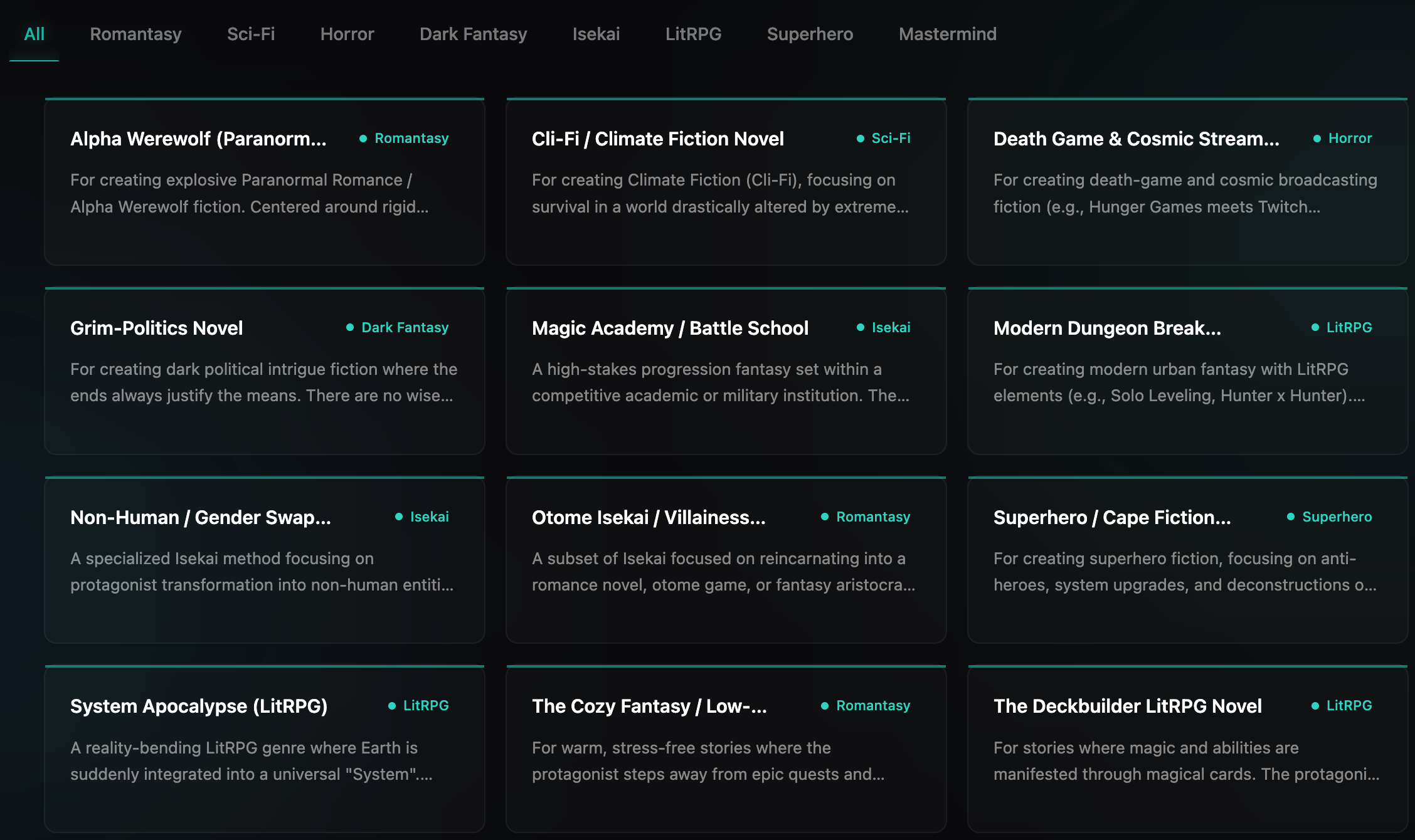
We are continuously adding and refining Creation Methods. You can browse all currently available methods on the "Creation Methods" page in the desktop app, and click "Sync" anytime to get the latest additions.
If the genre you want to write doesn't have a matching Creation Method yet, we'd love to hear from you — tell us what you need, and we'll prioritize building it.
How to Use Creation Methods
Step 1: Browse Creation Methods
In the desktop app sidebar, click the "Creation Methods" page to browse all available methods.
- Filter by Genre: Top tabs group methods by genre category (Eastern Fantasy, Sci-Fi, etc.) — click to filter
- Search: Use the search bar to find methods by name or description
- View Details: Each method card shows its name, description, and genre
Step 2: Select When Creating a Novel
On the "Novels" page, click "New Novel" and select a Creation Method in the form. This is the most crucial step — it determines your entire work's module structure.
Step 3: Start Writing
After selecting a method and creating your novel, enter the editor to find:
- Module Tree Ready: The left-side module tree has been pre-populated with groups and modules based on the method's configuration
- Genre-specific Fields: Each module type has form fields tailored to the genre
- AI Skills Loaded: Type
/in the AI assistant to see the method's exclusive skills are already available
What Makes Up a Creation Method
Each Creation Method consists of these core components:
Module Types
Module types define what kinds of content nodes you can create and what fields each node has.
For example, a "Classic Xianxia" method might include:
| Group | Module Type Examples | Purpose |
|---|---|---|
| Settings | Cultivation System, Sect System, World Laws | World-building foundation rules |
| Characters | Xianxia Character Card | Fields for cultivation realm, techniques, artifacts, etc. |
| Scenes | Xianxia Scene Card | Fields for spiritual energy density, terrain features, etc. |
| Organizations | Sect/Faction Card | Fields for rules, heritage, territory, etc. |
| Props | Artifact/Pill Card | Fields for grade, effects, crafting method, etc. |
| Chapters | Chapter | Main text writing |
Different genres have completely different module type designs. Sci-fi might have "Tech Tree" or "Planet" modules, while mystery might have "Clue" or "Suspect" modules.
Singleton Modules
Some module types are marked as Singleton. After selecting a method, the system automatically creates one module for each singleton type. These are typically setting-type modules — they form the foundation of the entire world-building and each work only needs one copy.
For example: After selecting the "Classic Xianxia" method, the system auto-creates "Cultivation System", "Sect System", and other setting modules that you can start filling in immediately.
Genre-specific AI Skills
Each Creation Method comes with a set of exclusive AI skills. These skills ensure the AI follows the genre's conventions and rules when performing tasks.
For example:
- Character Generation Skill: AI designs character attributes based on the genre (Xianxia cultivation realms vs. Sci-Fi tech equipment)
- Setting Generation Skill: AI follows the genre's common patterns when filling in world-building settings
- Plot Planning Skill: AI references classic narrative structures of the genre when designing the plot
Syncing Creation Methods
Creation Methods are maintained and continuously updated by the Qritor team. To get the latest methods:
- Click "Creation Methods" in the sidebar
- Click the "Sync" button at the top of the page
- The system will download the latest methods and associated AI skills from the cloud
After syncing, new methods will immediately appear in the list and can be used for new novels.